Quasimorph Keyboard Controls
Movement, combat, inventory, and rebindable shortcuts for PC
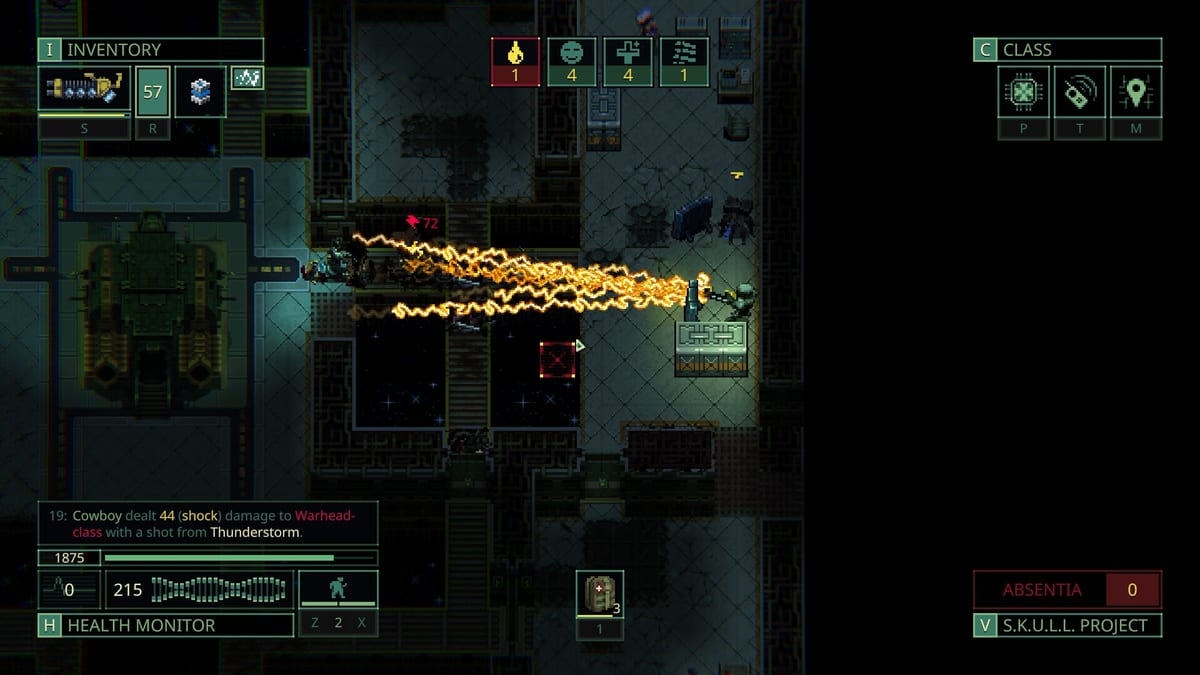
Quasimorph keyboard controls blend classic roguelike movement with mouse-driven aiming and inventory. Magnum Scriptum ships sensible defaults, but almost every regular rebinding movement to WASD and wait to Space or B within the first hour. Understanding what is bindable in Options versus what still requires a click saves frustration during your first extractions on Mars or deeper World stations.
Movement and camera
By default, Quasimorph maps grid movement to the arrow keys. Each press moves your clone one tile on the tactical map unless a status effect blocks movement. You can rebind these four directions to WASD or any keys you prefer under Options, then Keybindings. Diagonal movement is not available; pathing follows the four cardinal directions like traditional roguelikes. The camera follows your clone automatically. Patch 1.0.2 reworked camera dragging so the view follows the mouse instead of scrolling in the direction of a held key. Middle mouse drags the minimap; left click on the minimap jumps the camera to that point. A Camera Scroll Speed option lives in settings. Highlight Map Objects works with controllers. Keyboard and controller users can open a corpse inventory when the body sits on an adjacent tile behind a door.
Movement speed is not just flavor. Your current Combat Stances stance determines action points per turn and calorie drain. Cycle stances with the binding shown in the HUD, commonly a key near movement or a mouse-accessible UI button. Sneak for one action, walk for two, sprint for three. Sprinting while trying to shoot is a common rookie mistake because accuracy drops sharply. Bind stance toggles somewhere your left hand can reach without looking away from doorways.
Wait, end turn, and action economy
The wait command passes your turn deliberately. Quasimorph labels this Skip Turn or Wait depending on patch text, and players often bind it to Space because it sits naturally under the thumb while WASD handles movement. Other roguelike veterans prefer B. Either way, waiting lets enemies walk into your line of fire, burns fewer calories in some stances, and avoids opening a door on your last action point, a mistake that gets clones killed daily.
Remember that rearranging inventory, reloading, throwing, and interacting with objects can consume actions or trigger special conditions depending on context. The Getting Started guide explains when looting is free in sneak stance versus when it costs time in combat. If your turn feels stuck, check whether a context menu is still open or whether you are in a special mission mode like Defence arenas.
Mouse combat essentials
Quasimorph remains mouse-forward for combat even when movement is on keyboard. Left-click a tile to move if you prefer click-to-move, or confirm movement after keyboard input depending on settings. Left-click an enemy to attack with your active weapon using the current fire mode or melee pattern. Right-click opens the examine panel, which is mandatory once enemy resistances scale in mid-game. Robots shrug off pierce and fire but die fast to cut damage; you only learn that by examining before shooting.
Reload binds cleanly to keyboard. R is the usual choice and appears in Options. Reloading during a firefight costs time and may expose you in doorways, so bind it somewhere muscle memory already lives. Switching fire modes and selecting body parts for aimed shots still uses mouse clicks on weapon UI elements in most builds.
Throwing with Shift
Holding Shift while confirming an attack throws your equipped weapon or a readied grenade instead of performing a standard strike or shot. Throws are essential for finishing wounded targets through windows, clearing explosives, or dumping a empty gun before looting a heavier replacement. Because throw uses a modifier plus click, keep Shift on the left pinky and practice on Mars moons where the Quasimorph timer does not pressure you.
Throws also interact with weight and encumbrance. A overloaded Tunnel Rats looter throws slower in practice because turn order and action budgeting tighten when you are starving or over weight. Plan throws before sprinting across an open floor.
Inventory, ship screen, and healing
Press I to open the ship management and crafting screen while docked, matching common PC RPG habits. On mission, inventory is mouse-driven: click items, drag between panels, or use quality-of-life modifiers. Ctrl plus left-click auto-transfers an item between the active container and your clone, which is the single most important looting shortcut in Quasimorph. Shift plus click moves all items of the same type, perfect when stripping a armory locker after a Conquest mission.
Press H or use the healing UI button to apply bandages, splints, medkits, or sorbets to specific wounds. Medkits stabilize every wound type at once but are expensive to craft; bandages and splints target individual injury categories. This healing flow is separate from Crafting and Consumables recipes but uses the same items you queue on the ship. After Patch 1.0.1 and hotfix 1.0.562, many of these flows also have dedicated Keybindings — see the section below.
Patch 1.0.1 and 1.0.562 inventory hotkeys
Patch 1.0.1 and hotfix 1.0.562 added bindable inventory shortcuts that speed up extraction looting without replacing mouse drag. Open Options → Keybindings to assign them; defaults may differ by build string, so confirm after every Steam update.
Cargo Hold and Operatives Screen now have dedicated open keys listed in Keybindings. Use them on the Magnum between contracts to sort shuttle cargo without hunting through nested ship UI, and on mission to jump straight into the operatives panel when you need to swap meds or armor mid-run.
Hotfix 1.0.562 introduced previous tab and next tab bindings for inventory panels. Cycle between clone gear, ground loot, and container tabs without clicking headers — essential when you are strip-mining a dead squad under fire.
The move selected item to target tab binding sends the highlighted stack to the panel you last focused. Pair it with tab cycle keys to empty a corpse row-by-row using only keyboard focus, then confirm weight on the clone tab before you extract.
Ctrl hover transfer extends the classic Ctrl-click shortcut: hold Ctrl and hover over an item to preview transfer, then click to send it between the active container and your clone. This reduces mis-clicks when panels overlap on smaller resolutions.
While inventory is open, repair drag lets you drag repair kits onto damaged gear without closing the panel, and weapon switch bindings now work so you can change firearms before closing loot. Patch 1.0.1 also fixed container cursor placement so opening a corpse or locker places the cursor inside the correct container panel instead of defaulting to your clone inventory — a small fix that saves dozens of drag corrections per mission.
Outside inventory, 1.0.1 added three NPC HP/AP HUD modes under interface options: off, always visible, and hover only. Hover mode keeps the screen clean until you examine a grunt or robot, then shows health and action points for planning pierce versus cut shots. Keyboard-and-mouse players also get an expandable combat log that grows from a compact strip into a scrollable feed, useful when multiple enemies act in one turn.
For workflow tips beyond bindings, see Inventory Management, Patch 1.0.1 Notes, and Patch 1.0.2 Notes for the sort button and Cryochamber filters.
Doors, interaction, and examine
Doors define Quasimorph combat. Open them with a click when adjacent, but never spend your final action walking through unless you are sure the next room is clear. Closing or blocking doors is critical for melee builds yet often hides in the right-click context menu on the door tile rather than a dedicated keybinding. If you cannot find close door in Keybindings, use the context menu until you remap a community layout or mod hotkey.
Examine extends beyond enemies. Containers, corpses, traps, and mission objectives respond to right-click inspection. Examine before disassembling gear for crafting materials; you might salvage a rare component instead of breaking a trade-good weapon. Pair examine habits with the Loadout Planner so you know which damage types you brought before entering a robot-heavy floor.
Rebinding in Options
Open Options, then Keybindings, to remap movement, wait, reload, stance, and several utility keys. Quasimorph 1.0 expanded bindable actions compared to early access, but UI-only commands like unload all, finish mission, auto sort, and some door states may still lack entries. Document your personal layout after changes because clones inherit gear, not settings, across permadeath runs.
Suggested starter layout for new mercs:
- WASD movement
- Space wait
- R reload
- I ship screen when docked
- H heal menu on mission
- Shift throw modifier unchanged
- Mouse left attack, mouse right examine
Tying controls to builds
Keyboard efficiency matters differently per class. Scouts of Hades gunners reload often and peek corners in walk stance. Eclipse Blades melee players sprint through doors, then attack three times with series-of-hits weapons. Tifton’s Elite heavy teams alternate reload and suppressive fire. Visit Classes and Weapons after configuring keys so your hands match your loadout. When ready for structured progression, continue with Walkthrough missions and keep Steam Deck Controls bookmarked if you swap devices.
Frequently Asked Questions
Quick answers to the most common questions.
What are the default movement keys in Quasimorph?
Arrow keys move one tile per press by default. Most players remapped to WASD under Options, then Keybindings, without affecting other systems.
How do I wait or end my turn on keyboard?
Use the Wait or Skip Turn binding in Keybindings. Space and B are popular remaps because they match other roguelike habits.
How do I throw a weapon or grenade?
Hold Shift while clicking to attack. The game throws your equipped throwable instead of firing or meleeing normally.
What is the fastest way to loot containers?
Ctrl-click transfers items between panels instantly. Shift-click moves all matching stacks. Right-click corpses to examine before stripping gear.
Can I rebind every action in Quasimorph?
Most combat and movement keys are rebindable in Options. Some UI actions, including certain door commands and bulk inventory tools, still require mouse clicks or community mod hotkeys.
How do I reload without opening menus?
Bind Reload in Keybindings, commonly to R. Your clone reloads the active ranged weapon if ammo is available in inventory.
What inventory hotkeys did Patch 1.0.1 add?
Patch 1.0.1 and hotfix 1.0.562 added bindable keys to open Cargo Hold and Operatives Screen, cycle inventory tabs, move selected items to the target tab, Ctrl-hover transfer, repair drag, and weapon switching while inventory is open. Assign them under Options, then Keybindings.
How do I change NPC health and action point display?
Patch 1.0.1 added three HUD modes in interface options: off, always show HP/AP, or show only on hover. Hover mode balances clean visuals with tactical info when you mouse over enemies.